Cyber Security
What Is Web URL Filtering? Features, Benefits & Use Cases
Pawan PanwarApr 12, 2026
Preparing your workspace...
Loading latest data
Loading article...
Preparing blog content
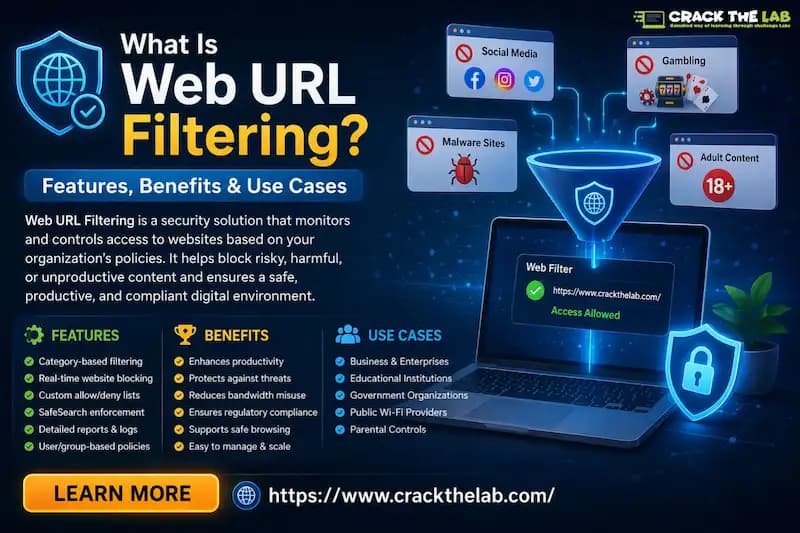
Do you want to know about what an amazing tech, Web URL Filtering, is? If yes, then you are at the right place. Here, we will explore the depth of Web URL filtering and the uses of this amazing technology, as explained by professionals.
Moreover, we will introduce you to a reputed training institute offering a dedicated training platform for cybersecurity. What are we waiting for? Let’s get straight to the topic!
By comparing requested URLs to an organization's pre-established block or allow policies, web URL filtering is a security measure that controls and limits access to particular websites. It effectively lowers the danger of malware infections and data exfiltration by preventing users from browsing to malicious, inappropriate, or unproductive domains through the use of categorized databases and real-time threat intelligence.
This technology serves as a vital first line of defense at the network perimeter or endpoint in contemporary settings, guaranteeing that traffic complies with corporate security standards. Let’s take a look at what Web URL Filtering is!
|
S.No. |
Steps |
How? |
|
1. |
Request Interception |
Before the request ever reaches the intended destination server, a security gateway or agent intercepts it when a user inputs a URL or clicks a link. |
|
2. |
Database Lookup & Categorization |
The program instantly compares the requested URL with an extensive, real-time database that categorizes websites according to reputation score and category (such as "Malicious," "Social Media," and "Financial"). |
|
3. |
Policy Enforcement |
To decide whether to allow, prohibit, or alert the user, the system compares the URL's classification and risk score to the organization's set security policy. |
|
4. |
Dynamic Threat Analysis |
Advanced filtering employs sandboxing or AI-driven analysis to instantly check the content of unknown or "gray-area" websites for malicious payloads, phishing elements, or hidden scripts. |
|
5. |
Logging and Reporting |
Every action, whether a block or a successful request, is recorded, giving security professionals insight into user surfing habits and possible signs of compromise for additional analysis. |
The following are types of URL filtering techniques:
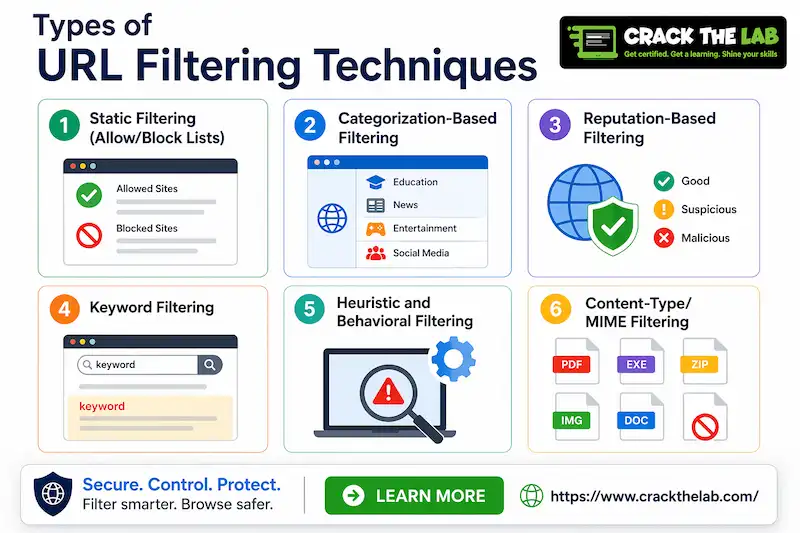
The following are the key features of Web URL filtering solutions:
● AI-Powered Real-Time Threat Intelligence: Classifies unfamiliar URLs using machine learning and blocks zero-day phishing websites as soon as they are formed.
● Granular Policy Enforcement: Enables administrators to specify particular access restrictions according to user roles, groups, time of day, or location.
● SSL/HTTPS Inspection (Deep Packet Inspection): Ensures that harmful payloads aren't concealed within secure connections by decrypting and scanning encrypted web traffic.
● Seamless Integration with Security Ecosystems: Connects directly to SIEM, EDR, and SD-WAN systems to exchange threat intelligence and automate coordinated protection measures.
● Comprehensive Reporting and Behavioral Analytics: Offers comprehensive visual dashboards that monitor bandwidth usage, high-risk activities, and user browsing patterns for proactive risk management.
|
S.No. |
Benefits |
How? |
|
1. |
Drastic Reduction in Malware and Ransomware |
Stops attacks before they reach the endpoint by preventing users from accessing command-and-control (C2) domains and known infection vectors. |
|
2. |
Enforced Regulatory and Corporate Compliance |
Ensures that the company complies with industry regulations (such as CIPA or GDPR) by preventing access to content that is prohibited, offensive, or illegal. |
|
3. |
Improved Employee Productivity and Bandwidth Management |
Optimizes network performance for business-critical applications by restricting access to high-bandwidth streaming services and non-work-related websites. |
|
4. |
Protection Against Phishing and Credential Theft |
Uses real-time page behavior analysis to intercept clicks to fraudulent websites that are intended to collect usernames and passwords. |
|
5. |
Enhanced Visibility and Security Analytics |
Gives security teams unique insights into user activity and online traffic patterns, enabling them to spot any insider threats and shadow IT. |
The following are some of the common use cases across industries:
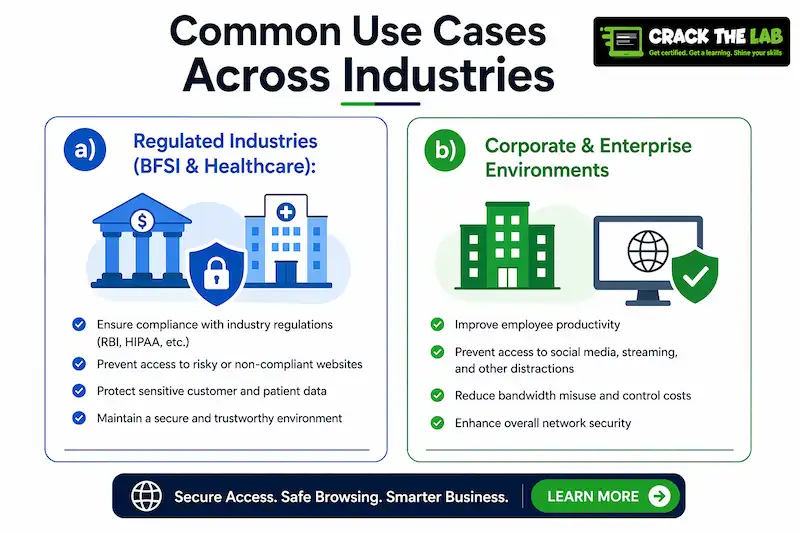
a) Regulated Industries (BFSI & Healthcare): In order to ensure rigorous compliance with data privacy regulations like HIPAA and GDPR and protect sensitive financial or patient information from phishing-based exfiltration, some firms use URL filtering to prohibit employees from accessing high-risk or hostile domains.
b) Corporate & Enterprise Environments: Businesses employ these restrictions to minimize network bandwidth by limiting access to non-essential, high-consumption streaming services, enforcing acceptable usage regulations, and increasing productivity by banning distracting social media or entertainment content.
c) Education & Public Wi-Fi: By automatically blocking offensive, violent, or age-inappropriate information, category-based filtering helps schools and public organizations maintain safe surfing environments while protecting the network from malware and social engineering threats.
The following are the best practices for effective URL filtering implementation:
|
S.No. |
Factors |
What? |
|
1. |
Encrypted Traffic Blind Spots |
Filtering engines are unable to view the entire URL path or the content of the page without resource-intensive SSL/HTTPS inspection, which enables threats to conceal themselves inside encrypted tunnels. |
|
2. |
Rapidly Changing Threat Landscape |
Attackers frequently move more quickly than filtering databases can classify or stop them by using "domain shadowing" and temporary URLs that only last for a few minutes. |
|
3. |
Over-Blocking and False Positives |
Inadvertently blocking reputable business tools or research websites through aggressive filtering can result in "IT friction" and a high number of help desk tickets from irate staff members. |
|
4. |
Circumvention Tools |
Because astute users can utilize VPNs, encrypted proxies, or "The Onion Router" (Tor) to get around network-level filtering, an endpoint-based strategy is required to retain consistent control. |
|
5. |
Dynamic and User-Generated Content |
Modern "Web 2.0" websites, such as social media or GitHub, host both harmful and benign information on the same domain, making it challenging to block particular dangers without removing access to the entire helpful platform. |
The transition from static, reactive URL filtering to autonomous security systems that employ "World Models" and real-time agentic orchestration to anticipate and neutralize harmful intent before a website even loads is known as "AI-native web integrity."
By 2026, this technology will turn the web into a self-healing environment where "Intent Flows" take the role of conventional navigation, guaranteeing edge-processed, private verification of each contact to uphold a baseline of complete digital confidence.
1. What is URL filtering used for?
URL filtering is used for the following reasons:
a) Preventing Malware and Ransomware,
b) Enforcing Acceptable Use Policies,
c) Mitigating Phishing and Credential Theft,
d) Controlling Bandwidth Consumption, and
e) Ensuring Regulatory Compliance.
2. What is web filtering?
In order to safeguard users and network resources, web filtering is a security technique that limits or allows access to particular websites and online material depending on an organization's security policies, reputation scores, or content categories.
3. Should I turn on DNS filtering?
Yes, you should enable DNS filtering since it offers a crucial, low-latency layer of security that prevents hostile domains from ever connecting to your network.
4. What is the difference between URL filtering and web filtering?
While web filtering is a more general category of security solutions that includes URL filtering along with content analysis, reputation score, and application control, URL filtering is a specialized, granular technique that bans access based on precise website URLs.
5. What are two benefits of URL filtering?
The following are the 2 benefits of URL filtering:
a) Proactive Threat Prevention, and
b) Enforced Acceptable Use.
6. Are DNS and URL the same?
No, they are not the same. A URL (Uniform Resource Locator) is the whole web address used to find a particular page or resource on that server, whereas DNS (Domain Name System) is the Internet's "phonebook" that converts a domain name into an IP address.
7. What is the best DNS filter?
The "best" DNS filter depends on your particular environment, however, because of their enormous, real-time threat intelligence networks and remarkably low latency performance, Cloudflare Gateway and Cisco Umbrella are often regarded as the finest options.
8. What is the safest DNS to use?
There isn't a single "safest" DNS because the best option depends on whether you value speed and privacy (like Cloudflare), security and threat blocking (like Quad9), or parental control and filtering (like OpenDNS).
9. Which DNS can block all ads?
The best options for this are NextDNS and AdGuard DNS, which offer specialized filtering profiles made especially to prevent pop-ups, trackers, and advertisements on all devices and apps at the network level.
10. What is the best browser filter?
The "best" browser filter depends on whether you need an enterprise-grade security solution or a consumer privacy tool. For enterprise environments, solutions like Island or LayerX offer granular, policy-based browser security that integrates directly into corporate infrastructure, while Brave and Kahf are highly recommended for individual privacy due to their integrated tracker and content blocking.
Now that we have talked about what Web URL Filtering is, you might want to get a dedicated platform where you can train yourself to fight against online threats. For that, you can get in contact with Craw Security, offering a dedicated cybersecurity training platform, “Crack The Lab.”
On this platform, practitioners will be able to fight against fire malware and protect themselves while using their knowledge and skills. What are you waiting for? Contact, Now!
Top Related Posts